

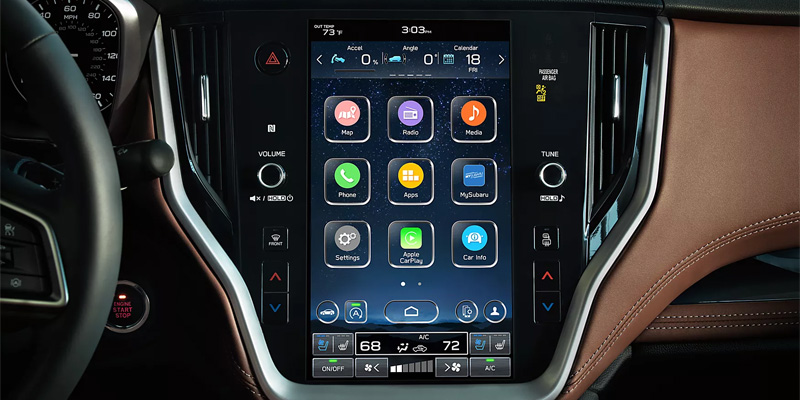
Apple CarPlay has revolutionized in-car connectivity by bringing your iPhone’s essential apps and features straight to your Subaru’s infotainment system. Whether you’re driving around Plattsburgh, NY, or heading out on a road trip, Apple CarPlay in Subaru vehicles ensures you stay connected and entertained safely. In this guide, we’ll explore how to set up Apple CarPlay in your Subaru, along with the benefits of this technology.
Why Apple CarPlay is a Must-Have in Your Subaru
Subaru vehicles are celebrated for their advanced safety and technology features, and Apple CarPlay is no exception. This feature allows you to access navigation, make calls, send and receive texts, and stream music—all hands-free and through your Subaru’s touchscreen. Paired with Subaru’s standard Symmetrical All-Wheel Drive, Apple CarPlay enhances every drive, whether it’s snowy roads in Plattsburgh or sunny highways elsewhere.
Notable Subaru tech features, including the STARLINK Multimedia system, make integrating Apple CarPlay seamless. The interface mirrors your iPhone screen, providing intuitive access to compatible apps without taking your focus off the road.
How to Set Up Apple CarPlay in Your Subaru
Setting up Apple CarPlay in your Subaru is easy and only takes a few minutes. Follow these steps to ensure a smooth Subaru Apple CarPlay setup:
1. Check Compatibility: Subaru models like the Crosstrek, Outback, and Ascent from recent years come equipped with Apple CarPlay compatibility. For detailed specs, consult your Subaru owner’s manual or visit Della Subaru in Plattsburgh, NY.
2. Connect Your iPhone: Use a certified Lightning cable to connect your iPhone to the USB port in your Subaru. Some newer models also offer wireless Apple CarPlay, which can be activated via Bluetooth.
3. Enable CarPlay on Your iPhone: Go to your iPhone’s settings, select “General,” and tap “CarPlay.” Choose your Subaru from the list of available vehicles to pair your device.
4. Customize Your Apps: Once connected, you can arrange your apps through the CarPlay settings on your iPhone, ensuring quick access to your most-used features.
Following these steps will have your Subaru infotainment system ready to enhance your daily drives with Apple CarPlay. If you encounter any issues, the team at Della Subaru in Plattsburgh is always ready to help.
Benefits of Using Apple CarPlay in Your Subaru
Apple CarPlay doesn’t just make your drives more convenient—it also adds an extra layer of safety and enjoyment. Here are some standout benefits:
– Enhanced Navigation: Use Apple Maps, Google Maps, or Waze for real-time traffic updates and accurate directions, perfect for navigating Plattsburgh or exploring beyond.
– Seamless Communication: Apple CarPlay enables hands-free calling and texting with Siri voice commands, ensuring you stay connected without distractions.
– Entertainment on the Go: Stream your favorite playlists, podcasts, or audiobooks directly through your Subaru’s audio system. Popular apps like Spotify and Audible are fully integrated with CarPlay.
– Integration with Subaru Tech Features: Subaru’s STARLINK system complements Apple CarPlay by offering additional controls, ensuring a smooth and unified experience.
Troubleshooting and Tips for Apple CarPlay
Sometimes, technology can be finicky. If your Subaru Apple CarPlay setup isn’t working as expected, here’s what you can do:
1. Check Your Connection: Ensure your phone is securely connected via USB or Bluetooth.
2. Update Software: Both your iPhone and Subaru infotainment system should be running the latest software versions.
3. Restart Devices: A simple restart of your iPhone or Subaru system can resolve most issues.
4. Visit a Professional: If problems persist, the experts at Della Subaru in Plattsburgh, NY, can provide personalized assistance.
For a comprehensive Apple CarPlay setup guide or advice on other Subaru tech features, Della Subaru is your go-to resource, contact us today.
Connect with us


- 2026 Fuel Efficient Subaru
- 2026 Subaru Ascent
- 2026 Subaru Ascent Plattsburgh, NY
- 2026 Subaru Ascent Trim Levels
- 2026 Subaru Crosstrek
- 2026 Subaru Crosstrek Plattsburgh, NY
- 2026 Subaru Forester
- 2026 Subaru Outback
- 2026 Subaru Outback Features
- 2026 Subaru Outback Technology
- 2026 Subaru Outback vs. 2026 Subaru Forester
- 2026 Subaru Solterra
- 2026 Subaru Solterra Plattsburgh, NY
- 2026 Subaru Technology
- 2026 Subaru Trailseeker
- 2026 Subaru Trailseeker Plattsburgh, NY
- 2026 Subaru Uncharted
- 2026 Subaru Uncharted Plattsburgh, NY
- 2026 Subaru Wilderness Models
- Auto Fluid Plattsburgh, NY
- Connecting Your iPhone To Your Subaru
- Della Subaru
- Della Subaru in Plattsburgh
- Della Subaru of Plattsburgh
- DELLA Subaru of Plattsburgh Service
- Glens Falls, NY Subaru Dealer
- Glens Falls, NY Subaru Service
- Glens Falls, NY Used Cars
- How To Set Up Apple CarPlay in Your Subaru
- How To Use Apple CarPlay in Your Subaru
- Mitsubishi Finance Center NY
- New Subaru Models
- New Subaru Trailseeker
- New Tires Plattsburgh NY
- OEM Tires Plattsburgh, NY
- Oil Change Plattsburgh, NY
- Spring Car Care NY
- Spring Car Care Tips
- Subaru Ascent Plattsburgh, NY
- Subaru Crosstrek Plattsburgh, NY
- Subaru Dealer Plattsburgh
- Subaru Finance Plattsburgh, NY
- Subaru Lease Benefits
- Subaru Lease Benefits NY
- Subaru Lease Plattsburgh, NY
- Subaru Loan Plattsburgh, NY
- Subaru Maintenance Plattsburgh, NY
- Subaru Outback Plattsburgh, NY
- Subaru Parts Plattsburgh, NY
- Subaru SUV Plattsburgh, NY
- Subaru Technology
- Subaru Tires Plattsburgh, NY
- Subaru Tires Plattsburgh, NY,
- Subaru Trailseeker Plattsburgh, NY
- Subaru Uncharted Plattsburgh, NY
- SUVS for sale Plattsburgh, NY
Categories